Lunes, Pebrero 29, 2016

Lesson 13: Cooperative Learning with the Computer


         Cooperative or Collaboration learning is learning by small groups of students who work together in a common learning task. It is often called group learning but to be truly cooperative learning. 

                            5 Elements are needed: 

                                     Common  goal

                                       Interdependence 

                                             Interaction 

                               Individual accountability 

                                           Social skills
         From several studies made on cooperative learning, it is manifested that cooperative learning in its true sense is advantageous since it:

* Encourage active learning, while motivating students.
*  Increase academic performances.
*  Promotes literacy and language skills.
*  Improves teacher effectiveness. 

          In addition,  there are studies which show that cooperative learning enhances personal and social development among students of all ages, while enhancing self-esteem and improving social relationship between racially and culturally different students. 

                               Cooperative Learning 
                          and the Computer 


              Researchers have made studies on the learning interaction between students and the computer . The studies have great value since it has been a long standing fear that the computer may foster students learning in isolation that hinders the development of student's social now this mythical fear has been contradicted by studies which show with the computer in group, they cluster and interact with each other for advice and mutual help. 
            And given the option to work individually or in a group, the student's generally wish to work together in computer-based and non-computer-based activities.Reflecting on this phenomenon, psychologists think the computer fosters this positive social behavior due to the fact that it has a display monitor-just like a television set-that is looked upon something in communal.
         Therefore researchers agree that the computer is a fairly natural learning vehicle for cooperative ( at times called primitive ) learning. 
            Educators are still wary about the computer's role in cooperative learning.  Thus they pose the position that the use of computers do not automatically result in cooperative learning. Therefore assign the teacher several tasks in order to ensure collaborative learning. These are:

* Assigning students to mixed-ability. 
* Establishing positive interdependence.
* Teaching cooperative social skills.
* Helping groups process information. 


Lesson 12: Information Technology in Support of Student-Centered Learning Classroom

                                 Traditional Classroom
              Traditional Classroom is where the teacher is the center of the classroom. They are ones who have the authority to fill their pupils knowledge.  The students are just listener and all they have to do is to pay attention to what their teacher have always saying. 


                     Student-Centered Learning (SCL)
              The SCL is the opposite of the traditional classroom,  in this learning process the students are working in the classroom they have the authority to do what they want, and the teacher serves only ad a facilitator . The teacher let her student to discover things through interdependence or even through themselves individually. 


                 In our modern world and with this type of learning process the ICT have a big factor in developing  one's skill and creativity in the way of what they want. 
Generally the new school classroom environment is characterized by student individually or in a group:

- Performing computer world processing for text or graph presentation. 
-Searching for information on the internet 
-Brainstorming on ideas, problems and project plans 
-As needed, the teacher facilitating instruction,  also giving individual instruction to serve individual needs. 

           But even through SCL is much indeed, most of the teachers used a collaboration of traditional way of learning and the SCL, and so by this the teaching and learning process have much greater success.


Lesson 11: The Computer as the Teacher's Tool


             We will study here not just about what a computer is, we will know here what could be the capabilities of the computer in terms of using it as a tool in learning.
                     Constructivist was introduced by Piaget (1981) and Bruner (1990).  They gave stress to knowledge discovery of new meaning/concepts/principles in the learning process. Various strategies have been suggested to foster knowledge discovery, among these, is making students engaged in gathering unorganized information from which they can include ideas and principles. Students also apply discovered knowledge applicable to real life situation.

                      While knowledge is constructed by the individual learner in constructivism, knowledge can also be socially constructed. Social constructivism this is an effort to show that the construction of knowledge is governed by social, historical and cultural contexts . In effect, this is to that the learner who interpret knowledge has a predetermined point of view according to the social perspectives of the community or society he lives in. 


Learning Framework

Constructivism

Social Constructivism


Assumption

Knowledge is constructed by the individual.

Knowledge is constructed within a social context.


Definition of Learning

Students build their own learning.

Students build knowledge influenced by the social context.

Learning Strategies

Gather unorganized information to create new concept/principle

Exchange and share from ideas, stimulates thinking.

General Orientation

Personal discovery of knowledge.

Students discuss and discover meanings

Example

8*5-8+8+8+8+8

 Two alternative job offers option 1-8 hrs/day for 6 days/week

Option 2-9 hrs/day for 5 days/week


                         The Computer's Capabilities

                    Given its present-day speed, flexibility and sophistication,  the computer can provide access to information, foster creative social knowledge building, and enhance the communication of the achieved project package.  Without the computer, today's leanings may still be assuming the tedious task of low-level information gathering, building and new knew knowledge packaging. But this is not so, since the modern computer can help teacher-and-students to focus on more high level cognitive tasks. Based on the two learning theories,  the teacher can employ the computer as a/an:

   * A communication tool
   * A constructive  tool
   * As co-constructive tool
   *  A simulation tool
                                                                        Informative Tool

              The computer can provide vast amounts of information in various forms, such as text, graphics, sound and video. Even multimedia encyclopedias are today available on the internet.  The internet itself provides and enormous database from which user can access global information resources that includes the latest news, weather forecast,  airline schedule, sports development,  entertainment news and features, as well as educational information directly useful to learners. The internet on educational can be sourced for kinds of educational resources on the internet.  


 Constructive Tool
             The computer itself can be used for manipulating information, visualizing one's understanding and building new knowledge. The Microsoft Word computer program itself is a desktop publishing software that allows uses to organize and present their ideas in attractive formats.


   Co-constructive Tool
        Students can use constructive tools to work cooperatively and construct a shared understanding of new knowledge.  On ways of co-constructive is the use of the electronic whiteboard where students may post notices to a shared document/whiteboard. Students may also co-edit the same document from their homes.  


       Situating Tool
             By means of virtual reality (RS) extension systems, the computer can create 3-D images in display to give the user the feeling that are situated in a virtual environment  . A flight simulation program is an example of situating tool. 


Lunes, Pebrero 8, 2016

Lesson 10: The Computer as a Tutor

    
      The computer is one of the wonders of human ingenuity, even in its original design in the 1950's to carry out complicated mathematical logical operations. With the invention of the microcomputer (now commonly referred to PCs or Personal Computer),  the PC has become the tool for programmed instruction.
      Educators saw much use of the PC. It has become affordable to small business, industries and homes. They saw its potential for individualization in learning, especially as individualized learning is a problem since teachers usually with a class of forty or more learners. They therefore devised strategies to use the computer to the break the barriers to individualized instruction.

                  COMPUTER-ASSISTED                 INSTRUCTION

      The computer can be a tutor in effect relieving the teacher of many activities in his personal role as classroom tutor. It should be made clear, however, that the computer cannot totally replace the teacher shall continue to play the major roles of information deliverer and learning environment controller. Even with the available computer and CAI software, the teacher must:

  • Insure the students have the needed knowledge and skills for any computer activity. 
  • Decide the appropriate learning objective.
  • Plan the sequential and structured activities to achieve objectives.
  • Evaluate the student's achievement by ways of test the specific expected outcomes
   

On the other hand, the student in CAI play their own roles as learners as they:
  • Receive information 
  • Understand instruction for the computer activity
  • Retain/keep in mind the information and rules for the computer activity
  • Apply the knowledge and rules during the process of computer learning


During the computer activity proper in CAI the computer too plays its roles as it:

  • Act as a sort of tutor ( the role traditional played by the teacher).
  • Provides a learning environment 
  • Delivers learning instruction 
  • Reinforces learning through drill and practice
  • Provides feedback

CAI Integrated with Lesson

      CAI computer learning should not stop with the drill and practice activities of students in effect, CAI work best in reinforcing trough repetitive exercise such that student can practice basic skills or knowledge in various subject areas. Common types of drill and practice programs include vocabulary building, math facts, and basic science, and history or geography facts. 

                               SIMULATION PROGRAM


     Simulation software materials are another kind of software that is constructivist in nature.
This simulation software:
  • Teacher strategies and rules applied to real-life problems/simulations.
  • Asks students to make decision on models or scenarios.
  • Allows students to manipulate elements of a model and gets the exercise of the effects of the effects of their decisions.
      An example of such software is SimCity in which students are allowed to artificially manage a city environment.
     Decision-making involve such factors as budget, crime, education, transportation, energy resources, waste disposal,business/  industry.


                              INSTRUCTIONAL GAMES


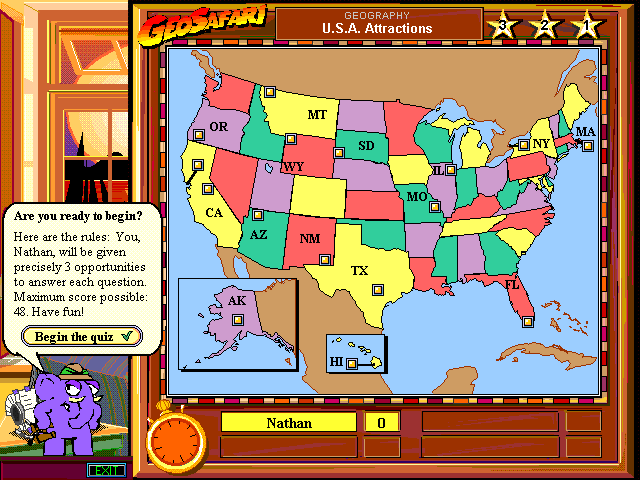
   While relation to low-level learning objectives (e.g. basic spelling or math skills), instructional computer games add the elements of competition and challenge.

  An example is GeoSafari which introduce adventure activities for Geography History and Science. The programs can be played up to four players to form teams.

                 PROBLEM SOLVING                 SOFTWARE


    These are more sophisticated than the drill and practice exercises and allow students to learn and improve on their problem solving ability. Since problem cannot be solved simply by memorizing facts, the students have to employ higher thinking skills such as logic, recognition, reflection, and strategy-making.

      The Thinking Things 1 is an example of a problem solving software in which the team learners must help each other by observing comparing.

                 MULTIMEDIA ENCYCLOPEDIA                  AND  ELECTRONIC BOOKS 


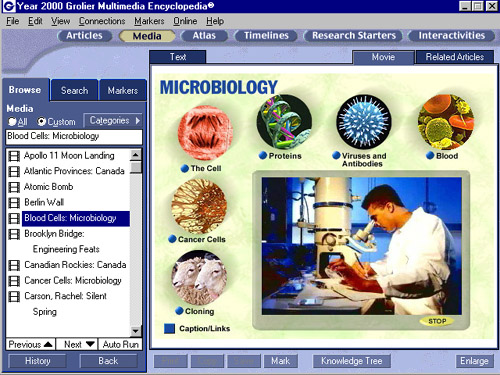
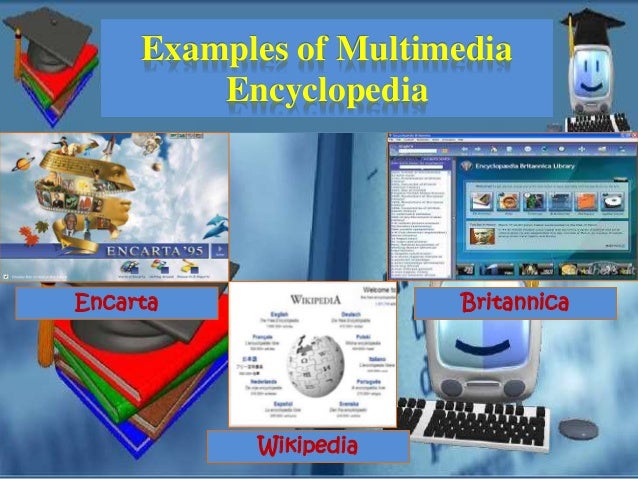
      The multimedia Encyclopedia can store a huge database with texts, images, animation, audio and video. Students can access any desired information, search its vast contents, and even download/print relevant portions of the data for their composition or presentation.
An example is the Eyewitness Children's Encyclopedia.

 Electronic Books provide textual information for reading, supplemented by other types of multimedia information (sounds, spoken words, pictures, animation). These are useful for learning reading, spelling and word skills. 


Lunes, Pebrero 1, 2016

Lesson 9: Computer as Information and Communication Technology

Introduction 
    Three revolutions in education  
1) Invention of the printing press 
2) The introduction of libraries 
3) The invention of the computer 
Resulta ng larawan para sa computer-assisted instruction  Computer-assisted instruction (CAI) was introduced using the principle of individualized learning through a positive climate that includes realism and appeal with drill exercise that uses color, music and animation. But the evolving pace of innovation in today's information Age is so dynamic that within the first decade of the 21st century, computer technology in education has matured to transform into an educative Information and Communication Technology (ICT) in education.

THE PC
Communication media             Audiovisual media


    (Internet)                                                                  (Multimedia)
   Email (text and video)                                              Text, sound, graphics
   Chat rooms                                                                  chart, photos
   Blog sites                                                                  Power-point presentation
   News services (print, video clip)                              CD, VCD, DVD player
   Music/movie/television room                                   CDVCD, DVD player
                                                                                      Educational software
                                                                                         (Internet)
                                                                                      Educational websites
                                                                                     Software’s , courseware’s
                                                                                      School registration/ records
                                                                                     Accounting                                                 

The Rise of Personal Computer (PC) with a computer in the classroom 

The teacher must: 
1) Demonstrate new lesson, present new material  
2) Illustrate how to use new programs 
3) Show new websites


The Personal Computer as ICT      
    Until the nineties, it was still possible to distinguish between instructional media and the educational communication media. Instructional media consist of audio-visual aids that served to learning process.Examples are the blackboard, photo, film and video. 

    On the other hand, educational communication media comprise the media of communication to audiences including learners using the print, film, radio, television, or satellite means of communication. For example, distance learning were implemented using correspondence , radio, television, or the computer satellite system.   

   Close to the turn of the 21st century, however, such a distinction merged owning to the advert of the microprocessor, also known as the personal computer .
   This is due to the fact that the PC user at home, office and school has before him a tool for both audio-visual creations and media communication. 
Programs (capabilities) normally installed in an ordinary modern PC: 
  • Microsoft Office- program for composing text, graphics, photos into letters, articles, report.

  • Power Point- for preparing lecture presentations.
  • Excel- for spreadsheets and similar graphic sheets.

  • Internet Explorer- access to the internet 
  • Yahoo or Google- websites; e-mail,chat rooms, blog sites, news service.
  • Adobe Reader- graphs /photos composition editing.

  • MSN- mail/chat messaging
  • Windows Media Player- CD, VCD player.
  • Cyberlink Power- DVD player 

  • Gatehouse- video games